


Hey there 👋, I’m Bryan
Welcome to my newsletter. Each week I share advice and tackle tough questions about project & program management, transformation, driving change, and anything else about work that might be stressing you out. Thanks so much for being here. Send me your questions and in return I’ll humbly offer actionable real-talk advice 🤜🤛
This week’s newsletter is inspired by a question I received.
Q: I want to know if AI has truly made project management better or faster for people. How are you doing it?
Let’s be real. Most people aren’t excited to “do more with less”, in fact, most of us want to spend less time buried in administrative drag and more time solving meaningful problems. What if AI could actually help you “do less… with more?”
The world is moving faster than ever, and for project managers, expectations have been quickly changing as well. As PMs, we are no strangers to tools and SaaS products that help get the job done (I’ll save you the long list!). That said, it seems everyone under the sun is trying to “sell something” that promises to magically make all your worries disappear. This isn’t a new phenomenon and usually happens when technologies evolve. I don’t see this changing any time soon, in fact, I’d bet it gets worse before it gets better considering anyone can now spin up a new tool with Claude Code or Codex over a weekend.
As a general guideline, it’s wise to be cautious of anyone promising a silver bullet, and this may be more true now than ever. Any good PM knows that not many situations can be solved with the same out-of-the-box solution, and that there is a real price to pay when introducing a new tool into your workflow. Alas, AI is no different.
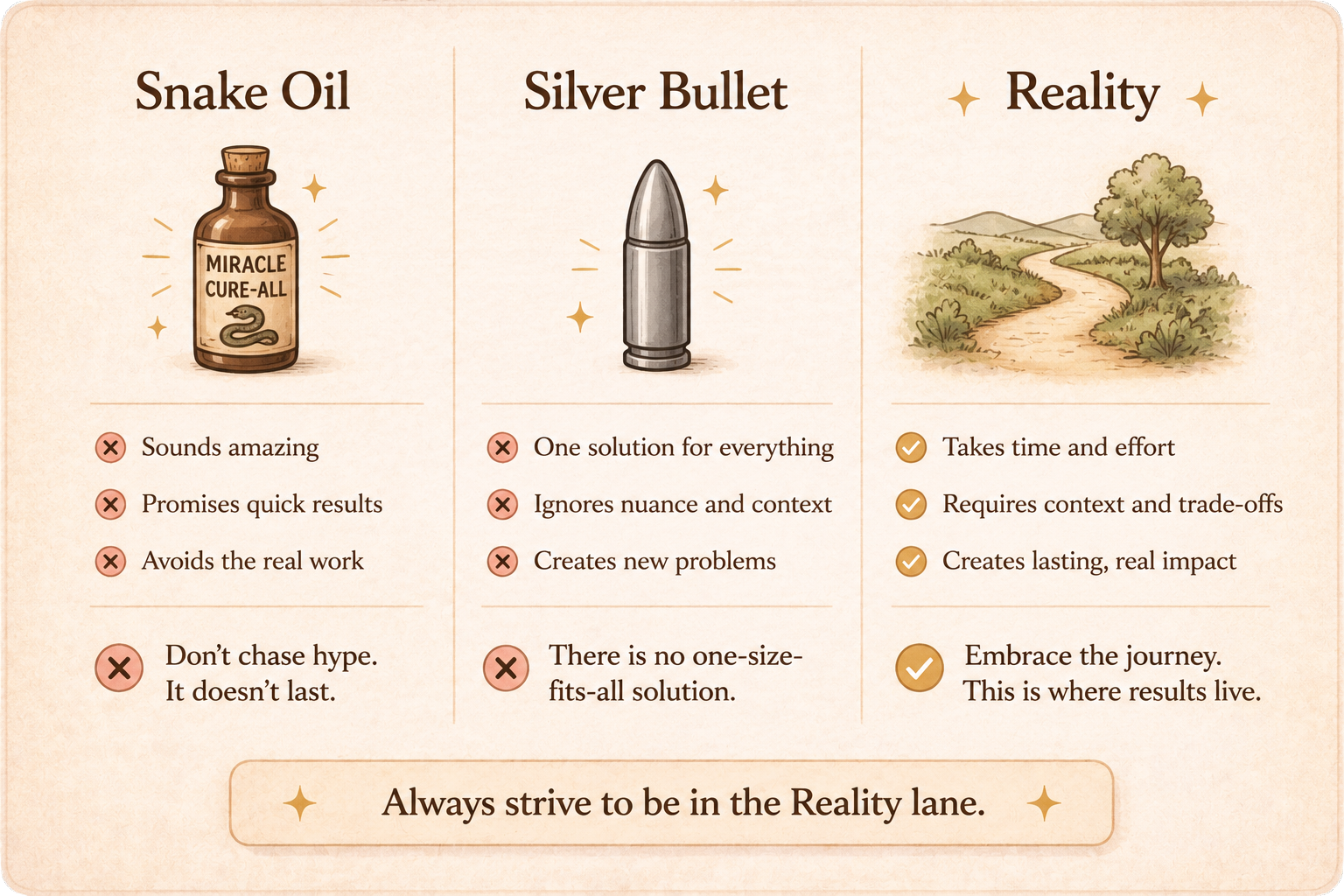
But let’s think about that for a second– “Anyone can now spin up a new tool with Claude Code or Codex over a weekend.” This has real implications. Sure, it increases the amount of noise in the marketplace today, but at the same time it liberates you from being a prisoner to someone else’s tool.
I sat down with over a dozen project managers from a range of industries that are all using AI in their daily workflows. Here are the 4 most widely adopted AI use cases being used by real PMs today.
Producing Documentation ✏️📄
Project Managers are constantly producing documentation — meeting notes, action items, key takeaways, risks, issues, decisions, status, stakeholder communications, weekly summaries. The list of artifacts can seem endless, and even for the most organized PMs, this admin work consumes a lot of time. Using AI to produce documentation is by far the current highest leverage activity you can do right now.
Tips
Record and transcribe all of your project meetings. This can be done with Microsoft Teams, Zoom, and Google Meet. Independent SaaS tools that received high praise are Granola, Otter, tl;dv, and Voicenotes. ClickUp also has an AI notetaker built into the platform.
Have AI produce the first draft of meeting notes. Example prompt you can copy/paste:
You are an expert note taker and communications specialist. I will provide a meeting transcript from my weekly team meeting for the [project name] project. Your job is to generate a polished email draft of the follow-up notes that I will send to attendees. Organize the notes into two clear sections:
Action Items — List as bullets. Each bullet should start with the bolded name of the responsible person followed by the task. If no specific deadline is mentioned, do not add one or make one up. If a deadline is mentioned in the transcript, include it concisely in parentheses.
Key Takeaways — Break these into bullet points grouped under succinct headers that summarize the topic (e.g., “[Topic Example]”. Each bullet should be detailed enough to convey meaningful updates but still succinct. This section is primarily for executive-level readers who need clarity and context at a glance.
Avoid filler language (e.g., “quick update”) and throat clearing, and do not summarize the entire transcript — just capture the essence and most important decisions, risks, issues, and next steps. DO NOT MAKE ANYTHING UP.
Here is the transcript: [paste transcript here]
Use AI to populate your remaining project documentation (RAID logs, status updates, etc.) - More on this in #2 - the intelligence layer. Depending on where your project documentation lives, populating logs from your meeting transcripts can be a real time save. Example Prompt for Claude or Co-Pilot in Excel you can copy/paste:
You are populating four logs in this Excel workbook from a meeting transcript: a Risk Log, an Issue Log, an Action Log, and a Decision Log. Treat this as a structured extraction task, not a summarization task.
STEP 1 — INSPECT THE WORKBOOK FIRST
Before extracting anything, inspect the workbook and identify the tabs (worksheets) that correspond to each of the four logs. Match by tab name using common variants:
- Risk Log: “Risks”, “Risk Log”, “Risk Register”, “RAID-R”
- Issue Log: “Issues”, “Issue Log”, “RAID-I”
- Action Log: “Actions”, “Action Log”, “Action Items”, “AIs”, “RAID-A”, “To-Dos”
- Decision Log: “Decisions”, “Decision Log”, “RAID-D”
For each matched tab, read the header row and list back to me the exact column headers you found, in order. Do not invent or rename columns. If a tab is missing, say so and ask whether to skip it or create it. If a single “RAID” tab combines all four, treat it as one tab with a Type/Category column and filter accordingly.
Pause here and show me the tab + column mapping before extracting. Wait for my confirmation.
STEP 2 — DEFINITIONS (use these strictly)
- RISK: a potential future event that has not yet occurred but could negatively impact scope, schedule, cost, or quality if it materializes. Phrased as uncertainty. (”If X happens, then Y.”)
- ACTION: a specific task someone committed to do, with an owner. Must be a verb-led item assignable to a named person or role.
- ISSUE: a problem that has already occurred or is actively occurring and needs resolution. Not hypothetical.
- DECISION: a choice that was made and agreed to in the meeting. Past-tense, concluded. Not “we should consider” — that’s an action or open question.
Disambiguation rules:
- If something is both an issue and triggers an action, log it in BOTH the Issue Log (the problem) and the Action Log (the response). Cross-reference by ID if the schema supports it.
- If a risk has an agreed mitigation owner, log it in BOTH the Risk Log and the Action Log.
- A decision that creates follow-up work generates one Decision row plus one or more Action rows.
- Do not log the same item twice within the same log.
STEP 3 — EXTRACTION POLICY
Extract items that are EXPLICIT (”we have a risk that the vendor slips”) OR CLEARLY IMPLIED by the conversation (”if the vendor doesn’t get us the SOW by Friday we’re in trouble” → risk: vendor SOW delay).
Do NOT extract:
- Speculation with no owner, no impact, and no follow-up
- Side commentary, jokes, off-topic chatter
- Status updates with no risk/issue/action/decision content
- Items you are guessing at — if you’re not confident it fits a definition, leave it out and note it in a “Candidates I excluded” list at the end
For each extracted item, your confidence must be defensible from a specific moment in the transcript. If asked, you should be able to point to the line(s).
STEP 4 — POPULATE THE LOGS
Fill the columns that exist in each tab. Honor the headers exactly — if a column is “Owner” don’t write to “Assignee.” Common fields and how to fill them:
- ID / #: use next sequential ID if existing rows are present; otherwise start at 1 with a sensible prefix (R-, A-, I-, D-).
- Date / Date Raised / Date Logged: use the meeting date (ask me if not obvious from transcript).
- Title / Summary: short, scannable, under ~12 words.
- Description: one to three sentences. Specific. No filler.
- Owner / Assignee: named person from the transcript. If unassigned but the action is real, write “UNASSIGNED” — do not guess.
- Due Date: only if stated or clearly implied (”by end of week,” “before next steerco”). Otherwise leave blank, do not invent.
- Status: default to “Open” for new items unless the transcript clearly says otherwise (e.g., a decision is “Approved,” an action already done is “Closed”).
- Priority / Severity / Impact / Likelihood: only fill if the transcript gives signal. Do not assign arbitrary High/Medium/Low. If the column exists and you have no signal, leave blank or write “TBD.”
- Source: “Meeting transcript — [date]” if a Source column exists.
- Any column you don’t have data for: leave blank rather than fabricate.
Write directly into the next empty row of each tab. Do not overwrite existing rows. Do not reformat existing headers or styles.
STEP 5 — REPORT BACK
After writing, give me:
1. Count of items added per log
2. Any items you logged in multiple places and why
3. Items marked UNASSIGNED that need an owner
4. Items with no due date that probably need one
5. A short “Candidates I excluded” list — borderline things you decided not to log, with one-line reasoning each, so I can overrule you
TRANSCRIPT
[paste transcript here]
Use AI to draft weekly summaries for managers, stakeholders, and project team members (even if no one still reads it 🙃). Example prompt you can copy/paste:
You are an expert note taker and communications specialist. I will provide one or more meeting transcripts covering a recent period (typically a week) for the [project name] project. Your job is to draft a single weekly project summary that I will send to everyone — managers, stakeholders, and the project team. One version, sent to all.
FIRST — SYNTHESIZE ACROSS TRANSCRIPTS
If I provide multiple transcripts, treat them as one connected week, not separate meetings. Before writing:
- Consolidate items that appear in more than one meeting into a single entry reflecting the latest state. If a risk was raised Monday and resolved Thursday, report it as resolved.
- Note when something changed over the week (a decision revisited, a deadline moved, an action completed) — that movement is often the most useful thing to report.
- Do not produce a per-meeting recap. The reader does not care which meeting something came from; they care what is true now.
STRUCTURE OF THE SUMMARY
Write one summary that serves a mixed audience. An executive should be able to skim it in a minute and know if the project is healthy; a team member should be able to find exactly what they own. Organize into these sections, in this order:
- Status line: one sentence on overall project health (on track / at risk / off track) with the single most important reason.
- Key Takeaways: bullets grouped under succinct topic headers that summarize the topic (e.g., “[Topic Example]”). Each bullet detailed enough to convey meaningful updates and context, but still succinct. Capture progress, changes in direction, and important context.
- Decisions Made: bulleted. Each decision with a brief one-line “why” so any reader can understand and explain it. A decision is something concluded and agreed — “we should consider X” is not a decision, it is an open question or an action.
- Risks & Issues: bulleted. All open risks and issues material to scope, schedule, cost, or quality, each with current owner and status. If something needs escalation or an executive decision, say so explicitly.
- Action Items: bullets, each starting with the bolded name of the responsible person followed by the task. If a deadline is mentioned in the transcript, include it concisely in parentheses. If no deadline is mentioned, do not add one or make one up. If an action has no owner, start the bullet with “UNASSIGNED.”
- Open Questions: anything raised but not resolved that readers should be aware of. Omit this section if there are none.
RULES
- Avoid filler and throat-clearing (”quick update,” “as discussed,” “just wanted to flag”). Lead with the substance.
- Do not summarize the entire transcript. Capture the essence — the most important decisions, risks, issues, progress, and next steps.
- Never invent a deadline, owner, status, or decision. If something is ambiguous, leave it out and note it at the very end under “Items I was unsure about.”
- Keep bullets scannable. Detailed does not mean long; one to two tight sentences each.
- Pitch the writing so it works for a mixed audience: clear enough for an executive skim, specific enough for the team to act on. When in doubt, be concrete.
TRANSCRIPT(S)
[paste transcript(s) here — label each one if helpful, e.g. “Monday standup,” “Thursday steerco”]
Where to be careful
AI doesn’t always get things perfect. It’s kind of like a very eager, junior team member, and it’s important to double check the work. This is because fundamentally, AI works by predicting the next word (token) in a sentence, it is not higher-level intelligence, and definitely no replacement for human judgement. Anyone can spit out pages upon pages of AI slop. To continue being a great PM, it’s important you are not that person. If you can make the transition from producer to editor you will increase your odds of increasing your productivity, and staying relevant. Keep your brain on, it’s needed.
Intelligence Layer 🧠
Once you get comfortable utilizing your meeting transcripts for one-off summarization and project artifact updates, the next natural progression is to begin looking at your project information all together. This might also include your emails, chats, and meeting transcripts for additional context.
How to do it:
In Claude Co-Work, create a new project and put all of your project documentation into a folder that Claude can access. You can connect ancillary information using Connectors. Once you have all of your information in one place that Claude can retrieve, simply start asking questions.
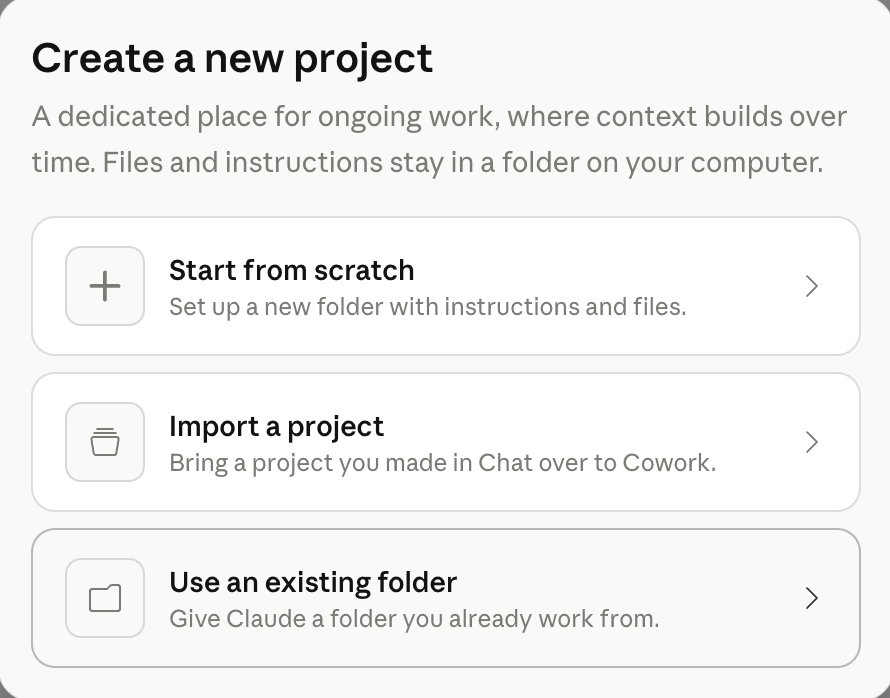
You can ask questions like:
What was decided about the data migration?
Who owns the vendor contract action?
What are all of the open action items assigned to Steve?
Has the tone around go-live gotten more or less confident over the past couple weeks?
Which actions were assigned, but have no due date?
Does anything in this week’s summary contradict the RAID log?
Where to be careful
The key to success with the intelligence layer is the organization of your files, and the clarity of your questions. This workflow is not difficult, but it is different. That said, you can realistically configure it in hours, not days. There is no code involved. The “heavy-lifting” is actually just information hygiene so Claude isn’t guessing which summary is current. The only reason you would go beyond this structure is scale. If you have many projects, or a project is running long enough that the document set gets genuinely large, then you will likely need to introduce a retrieval layer. That’s a conversation for another time.
Organization and Meeting Prep
Successful PMs today are using AI to summarize long chains of emails to synthesize what’s going on over a period of time. They are also using this same technique to stay sharp in meetings. For those days when you inevitably get asked a question about a minor detail that occurred at 3:08pm on a random Tuesday. For organization and meeting prep you can either use the intelligence layer you’ve built, or, simply copy and paste a handful of information into a Claude chat and ask away. The context windows of the LLMs have gotten pretty large and can likely handle your one-off prep session with ease. That said, if this becomes a repetitive workflow, you may want to consider a setup like the intelligence layer.
Where to be careful
The more context you put into the chat window, the more time and tokens ($) will be used to provide you an answer. Additionally, I would not recommend loading a month’s worth of transcripts into a Claude chat and expect excellence. A cluttered context window and broad, high-level questions is a recipe for crappy output. Remember, YOU are the real brain of the project, and the LLM is there to be a tool for you. It isn’t you. So ask pointed, clear questions regarding things you’re already thinking about. Then double check. Ask clarifying questions and gauge responses against your own knowledge and understanding. If something feels “off”, it probably is.
Ideas & Learning
Subject matter experts are worth their weight in gold. They are also usually incredibly hard to get on the calendar due to their in-demand nature. AI can be an incredible teacher. Many PMs are leveraging AI to get an initial grasp at understanding new concepts, and things for which you likely used to solely rely on subject matter experts. It can also help you for those moments when you need to call ‘BS’ on a vendor.
Where to be careful
AI is not going to replace the SME anytime soon, if ever. Use AI to enhance and focus the conversations that you have with your SMEs, not replace it. You’ll find that your conversations are more productive and get rolling more easily. Maybe the time you need from them is ultimately reduced! But be sure to not convince yourself that you are now the SME because the LLM output something that looked and sounded good.
In Summary
AI is increasingly being used to save time to allow humans to address more important things that only they can do. Things like managing relationships, navigating complexity, and keeping delivery on track. Starting with the tips in this guide, you can be on your way to spending less time producing documentation, and more time thinking and validating. The real value is in making the shift from producer to editor + decision filter. As a PM it’s important to be aware that AI can speed things up, including the noise, and it will be more important than ever to determine what is signal vs. what is noise. PMs still have to interpret, challenge, and decide what to do with the information coming their way. That part hasn’t changed, and likely never will.
What AI will probably not replace any time soon
Critical thinking
Judgement
Full project plan development
Discernment
Herding of the cats
Execution hasn’t changed - people and dependencies still break timelines
So what does all of this mean for the PM industry?
There are many concerns today about the PM job market. Jobs are harder to find and harder to land. PMs are noticing that expectations are not what they used to be, and in many cases are radically different from company to company. So how do you land your next PM role in this rapidly evolving time? — Start here. This newsletter is intended to help you stay relevant and understand how to ride the wave with the incoming changes. Over time, there will be a bifurcation of those that learn to deliver with the new tools and those that get left behind. My goal is to ensure you’re a part of the first group.
Sincerely,
Bryan 👋
P.S. - Let me know in the comments if you found this newsletter helpful. Your feedback would mean the world to me 🙏
Have someone in your life that would benefit from this newsletter? Feel free to forward this to them 💖
🔥 Featured Job Opportunities
Entry-Level Project Manager - Epic - Open Application for entry-level PMs
Construction Project Manager - SpaceX
Project Manager Marketing Operations, Packaging - Amazon
Sr. Project Manager - Microsoft
Business Program Manager, Data Center Operations - Google
🧠 Inspiration for the Week Ahead

Arya Satheesh, an 18-year-old student from Letterkenny, Ireland, won the European category of The Earth Prize 2026, a global environmental competition for teenagers. Her invention, Eco Purge, is a plant-based biodegradable plastic that does something most alternatives don’t: it embeds enzymes inside the material that release gradually as the plastic breaks down, attacking microplastics already present in the surrounding soil or water.
👋 Have a great week! 🙏